Getting Started
Digital Modes on the Hillside Repeater
New to digital radio? This guide walks you through everything you need to get on the air — no experience required.
What is a Digital Mode?
Traditional FM radio sends your voice as an analog signal — like an old AM/FM car radio. Digital modes convert your voice into data before transmitting it. The result is cleaner audio, less interference, and the ability to connect to repeaters and users around the world through the internet.
The Hillside Repeater supports four digital modes: D-STAR, System Fusion, DMR, and NXDN. This guide focuses on DMR — it's the most widely used digital mode in amateur radio, and the Baofeng DM-32UV is one of the most affordable tri-band radios that supports it.
The Radio We Recommend
Tri-band coverage, DMR digital mode, and FM analog — all for around $40.
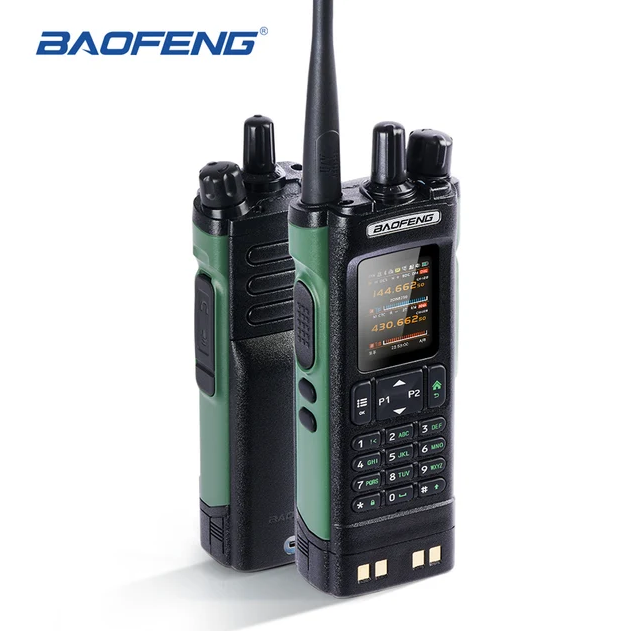
Baofeng DM-32UV
The Baofeng DM-32UV is a tri-band handheld that covers VHF (136–174 MHz), UHF (400–480 MHz), and the 220 MHz band (220–260 MHz). It supports DMR Tier II digital mode alongside standard FM analog, so you can use it on the Hillside Repeater and on traditional FM frequencies without carrying two radios.
It puts out a solid 10 watts on VHF and UHF — more than enough to hit the Hillside Repeater reliably. The built-in 3000 mAh battery gives you solid all-day runtime, and the large color display makes it easy to see your channel and talk group at a glance. At around $35–$50, it's hard to beat for a first DMR radio.
- Bands: VHF (136–174 MHz) / UHF (400–480 MHz) / 220 MHz (220–260 MHz)
- TX Power: 10W (VHF/UHF), 5W (220 MHz)
- Digital Mode: DMR Tier II
- Analog Mode: FM (standard)
- Battery: 3000 mAh Li-ion, USB-C charging
- Display: Color LCD
- Price Range: ~$35–$50 USD
- Where to Buy: Amazon, BuyTwoWayRadios.com, or any ham radio dealer
DMR Basics — What You Need to Know
DMR stands for Digital Mobile Radio. Think of it like a phone call over the radio — your voice is converted to digital data, sent through the repeater, and decoded on the other end as clear audio.
DMR uses "talk groups" instead of just frequencies. A talk group is like a chat room — you pick one, and everyone tuned to that same talk group on the same network can hear you. Some talk groups are local, some are regional, and some connect hams worldwide.
Color Code
Like a CTCSS tone for digital — it tells the repeater which signal to accept. The Hillside Repeater uses Color Code 1.
Talk Group
A numbered "channel" on the DMR network. You pick a talk group to join a conversation. Local, regional, and worldwide groups are available.
Time Slot
DMR splits each frequency into two time slots (1 and 2), allowing two conversations at once. Most local talk groups use Time Slot 2.
DMR ID
Your personal ID number on the DMR network — like a phone number for your radio. You register for one free at radioid.net.
Step-by-Step: Programming Your DM-32UV for the Hillside Repeater
Follow these steps to get your Baofeng DM-32UV programmed and ready to use on the Hillside Repeater. You'll need a programming cable (USB-K type) and the free CHIRP software, or you can use the Baofeng CPS (Customer Programming Software) that came with your radio.
Get Your DMR ID
Before you can use DMR, you need a free personal ID number. Go to radioid.net, create an account, and register your callsign. You'll receive a 7-digit number — this is your DMR ID. Write it down; you'll need it when programming your radio.
Your DMR ID is tied to your callsign. It's how the network knows who you are when you transmit.
Download the Programming Software
Download the Baofeng CPS (Customer Programming Software) from Baofeng's website, or use CHIRP (free, open-source, works on Windows/Mac/Linux). Connect your DM-32UV to your computer using the USB programming cable that came with the radio.
CHIRP is the most popular free option. Search for "CHIRP ham radio" to find it at chirpmyradio.com.
Enter the Repeater Frequency
Create a new channel in your software. Set the receive frequency to 444.650 MHz and the transmit frequency to 449.650 MHz (that's the +5.0 MHz offset). Set the channel mode to DMR.
The receive frequency is what you listen on. The transmit frequency is what you talk on. The radio handles this automatically once you enter both.
Set the Color Code
In the DMR channel settings, set the Color Code to 1. This is the Hillside Repeater's color code — without it, the repeater won't respond to your transmission.
Color Code 1 is the most common setting. Think of it like a digital handshake between your radio and the repeater.
Enter Your DMR ID
In the radio ID or subscriber ID field, enter the 7-digit DMR ID you registered at radioid.net. This is how the network identifies you. Also enter your callsign in the radio alias field if your software supports it.
If you skip this step, your transmissions will show up as "Unknown" on the network. Take a minute to register and enter your ID.
Choose a Talk Group
Add a talk group to your channel. A good starting point is Talk Group 1 (Local) Talk Group 31 (North America) or Talk Group 3182 (North Dakota). Set the time slot to 2 for most local and regional talk groups. Write the talk group number in the "Contact" or "Talk Group" field in your software.
Not sure which talk group to use? Start with TG 1 for local contacts, or TG 3182 for North Dakota. You can always add more later.
Write to the Radio and Test
Once everything is entered, click "Write" to send the programming to your DM-32UV. Then head outside (or near a window), key up briefly, and listen. If the repeater responds, you're on the air. Try monitoring a talk group for a few minutes to hear other operators.
Always listen before you transmit. Give your callsign when you key up, just like on FM.
Useful Talk Groups to Get Started
Here are a few talk groups to add to your radio. All use Time Slot 2 unless noted.
| Talk Group # | Name |
|---|---|
| 3182 | North Dakota |
| 31 | North America |
| 91 | Worldwide |
| 93 | North America 2 |
| 1 | Local / Simplex |
Need More Help?
You don't have to figure this out alone. Here are the best places to get answers.
Hillside ARC Discord
The fastest way to get help from club members. Ask questions, share your setup, and connect with other hams in the Bismarck–Mandan area.
Club ResourceHillside ARC on Facebook
Follow the club on Facebook for news, updates, and community posts.
Club ResourceRadioID.net — Register Your DMR ID
Register your callsign to get your free 7-digit DMR ID. Required before you can use DMR.
RequiredBrandmeister Network
The DMR network the Hillside Repeater connects to. You can see live activity, look up talk groups, and monitor who's on the air.
DMR NetworkDMR-MARC Talk Group List
A comprehensive list of DMR talk groups and how to use them.
DMR ResourceARRL DMR Overview
The ARRL's introduction to DMR — good background reading if you want to understand the technology.
LearningCHIRP Programming Software
Free, open-source radio programming software. Works with the Baofeng DM-32UV and hundreds of other radios.
Free ToolStill have questions?
The best place to get help is the club Discord — members check it regularly and are happy to walk you through any step.